
Multi-tenancy with Orgs
Table of Contents
If your deployment requires logical separation of departments within your organization, or if it involves supporting many distinct organizations from a single application instance, use the Orgs feature.
Using Orgs, you can set boundaries within the ThoughtSpot system and isolate each tenant’s data in such a way that it is independent of and invisible to other tenant workspaces configured on the same application instance.
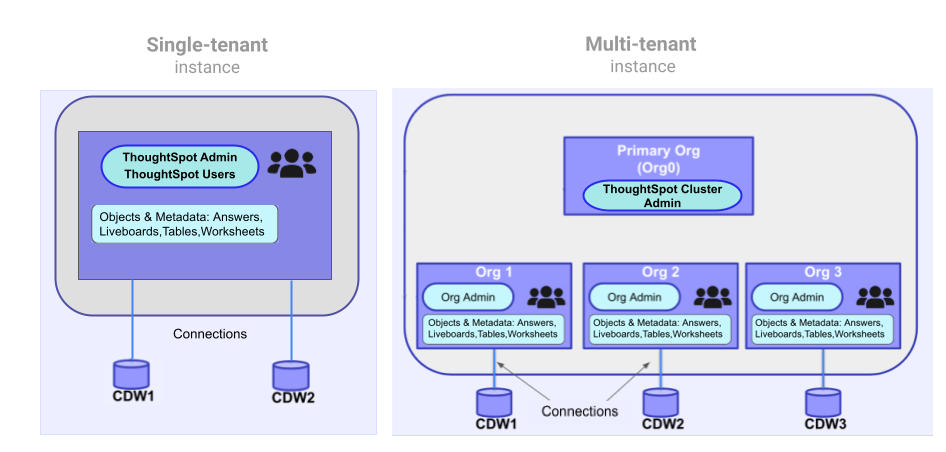
The following figure illustrates the primary difference between a single-tenant and multi-tenant deployment:
|
Important
|
|
Orgs in ThoughtSpot🔗
If the Orgs feature is enabled on your instance, a Primary Org will be created as Org 0.
The Primary Org behaves as the administration Org for all other Orgs in the cluster.
Each Org other than the Primary Org serves as an independent container with its own set of users, groups, and data objects, and provides the same user experience as that of a regular ThoughtSpot instance.
If a user only belongs to a single Org, their experience of ThoughtSpot is as if it were single-tenant.
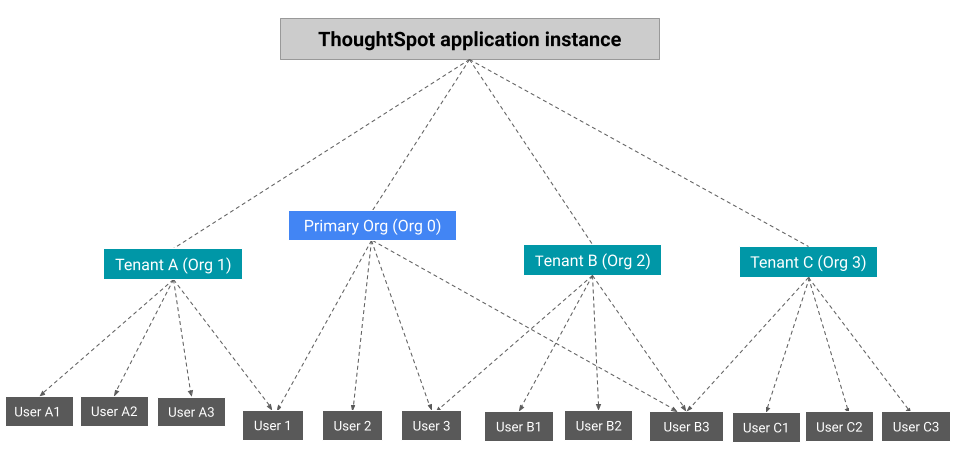
If a user belongs to multiple Orgs, they will see a menu allowing them to switch between the Orgs they belong to.
All activity within ThoughtSpot is always within the context of one Org, even if the user has access to multiple Orgs. They can switch between Orgs but not do any actions across Orgs.
Orgs deployment and administration🔗
The cluster administrator can create an Org for each tenant account, configure groups and assign users, and define access to data objects within that org.
The following figure depicts the Orgs presentation on a multi-tenant ThoughtSpot instance.
User roles🔗
On a multi-tenant instance, ThoughtSpot supports the following user roles:
-
Cluster administrator
By default, the administrator of the primary Org (Org 0) is assigned the privileges of a cluster administrator. The cluster administrator can access all Orgs and perform the following CRUD operations:-
Create and manage Orgs
-
Add users to Orgs
-
Administer cluster
-
Manage user identity and access management (IAM)
The cluster administrator can also act as an individual Org administrator and perform administration tasks within an Org context.
-
-
Org administrator
An Org administrator administers and manages users, groups, and data objects of their respective Org. Typically, Org administrators create groups within their Org and assign privileges to the users of their Org. -
Org users
An Org user can access only the Orgs to which they belong. A user can belong to more than one Org and access data objects and metadata based on the privileges assigned to the groups to which they belong.
All Orgs scope🔗
On a multi-tenant ThoughtSpot instance, all operations are run in the context of the Org.
If a cluster administrator wants to perform a Create, Read, Update, or Delete (CRUD) operation or apply a configuration change to all Orgs, they must override the Org context and apply the changes at the All Orgs level via the UI or API calls. If using API, the cluster administrator must explicitly set the Org scope to ALL in their API requests.
|
Note
|
|
Per Org custom embed URL (for custom link settings)🔗
Early Access
A user belonging to multiple Orgs can share ThoughtSpot objects such as Liveboards and Answers, with users of another Org. This will require the object to have share permissions, and both users to be part of the parent Org of the shared object.
Starting with ThoughtSpot Cloud 10.5.0.cl release, developers embedding ThoughtSpot in their application will be able to edit their custom link settings for their application users to allow seamless access to content from another different Org. For example, a user has access to Org1, Org2 and Org3. While the user is logged in to Org1, they can access a Liveboard shared by another user in Org3 without using the Org switcher.
This feature is turned off by default. To enable this feature on your instance, contact ThoughSpot Support. When this feature is enabled, the Org ID will be passed as an additional query parameter in the {ts-query-param} in the URL.
For example, if you have set the custom link as:
https://www.mysite.com/liveboard/{object-id}?{ts-query-params}
The resulting URL will be:
https://www.mysite.com/liveboard/22946f4b-b4ce-4643-be50-66afcd5177?orgId=0
The Org ID will be passed in the URL depending on the placement of {ts-query-params} in the custom URL.
|
Note
|
|
Feature availability on a multi-tenant instance🔗
On an Orgs-enabled cluster, certain UI and API operations are allowed only at the cluster level. The following table lists the features and configuration operations allowed at the cluster or individual Org level.
| Feature category | At the cluster level (All Orgs) | At the Org level |
|---|---|---|
User management | ✓ User creation and management ✓ User association to Orgs | ✓ User creation and management ✓ User association to groups |
Group provisioning, Roles and privileges | – | ✓ |
Authentication | ✓ Local authentication configuration ✓ Trusted authentication ✓ SAML authentication configuration ✓ OIDC authentication | ✓ Trusted authentication |
Access to | ✓ | ✓ |
Security settings (CORS settings) | ✓ | ✓ |
Security settings (CSP settings) | ✓ | – |
Data connections and objects | – | ✓ Object creation and management ✓ Data connection creation and management
|
Access control | ✓ Org creation for data isolation ✓ User mapping to Orgs | ✓ Groups and privilege assignment to users ✓ Object sharing with other users and groups in the Org |
Customization | ✓ Custom domain configuration ✓ From ID customization for system notifications ✓ Onboarding settings and welcome message customization | – |
Style customization and CSS overrides | ✓ | ✓ Per-Org CSS overrides can be applied using the CSS customization framework available with the Visual Embed SDK. |
Custom actions | – | ✓ Custom action creation and group association are supported by default at the Primary Org (Org 0) level. To enable action customization at the Org level, contact ThoughtSpot Support |
Link customization for embedded instances | ✓ | ✓ |
REST API and Visual Embed Playgrounds | – | ✓ |
REST API v2.0 endpoints | ✓ Org endpoints for CRUD operations | ✓ |
REST API v1 operations | ✓ Org endpoints for CRUD operations | ✓ |
Authentication considerations for embedded apps🔗
On a multi-tenant cluster with Orgs, ThoughtSpot supports local, SAML, and trusted authentication methods. If you are using Visual Embed SDK to embed ThoughtSpot in your app, use AuthType.Basic for local authentication, AuthType.TrustedAuthToken for trusted authentication, and AuthType.EmbeddedSSO or AuthType.SAMLRedirect for SAML SSO authentication. For more information, see Authentication.
Trusted authentication🔗
If Trusted authentication is enabled, Org users can obtain authentication tokens using the secret key. Org administrator or an authorized third-party authenticator service can also generate tokens on behalf of a ThoughtSpot user by using the secret key.
Starting from 9.2.0.cl, ThoughtSpot supports generating separate secret keys for each Org. To enable this feature on your instance, contact ThoughtSpot Support. When this feature is enabled, Org users can obtain separate authentication tokens to access their Org and switch between Orgs seamlessly.
Just-in-time user creation and dynamic privilege assignment🔗
If trusted authentication is configured in the SDK, you can request an authentication token via API calls to any of the following REST API endpoints:
-
REST API v1 -
/tspublic/v1/session/auth/token -
REST API v2 -
/api/rest/2.0/auth/token/full
If the user doesn’t exist in the ThoughtSpot system, you can autocreate a user account just-in-time and dynamically assign privileges by adding the user to groups.
The /tspublic/v1/session/auth/token API endpoint also allows you to define the Org context to which the user must be logged in to after successful authentication. However, the API requests to REST API v2.0 endpoint will automatically generate the token based on your current session context.
For more information, see Obtain an authentication token and Trusted authentication.
SAML authentication🔗
|
Note
|
To enable Orgs support for SAML authentication on ThoughtSpot, contact ThoughtSpot Support. |
For SAML authentication, ensure that the Org support is enabled for SAML authentication. For more information, see ThoughtSpot Product Documentation. You must also configure the Org information on your IdP so that the SAML users are allowed to access the Orgs to which they belong.
The following conditions apply to SAML authentication on a multi-tenant setup:
-
If Orgs support is enabled for SAML authentication, and the Org objects to which the user belongs are configured on ThoughtSpot:
-
Multiple Org names can be sent in the SAML assertion.
-
If the Org names are not sent in the SAML assertion, the user is logged in to the default Org (Primary Org).
-
If the user already exists in ThoughtSpot, the user is allowed to access the Orgs sent in the SAML assertion.
-
If the user does not exist in ThoughtSpot, the user is assigned to the Orgs sent in the SAML assertion but is not assigned to any group.
-
If the user is already created in ThoughtSpot and assigned to Orgs and the SAML assertion has different Org names, the user is assigned to only the Orgs sent in the SAML assertion. For example, if a user belongs to Org A and Org B and the SAML assertion includes Org C and Org D, the user is assigned to Org C and Org D and removed from Org A and Org B.
-
-
If Orgs support is enabled for SAML authentication and the Org objects are not configured ThoughtSpot, the authentication process returns an error.
-
If the Orgs support is not enabled for SAML authentication and Org objects are not configured, the user is assigned to the default Org (Primary Org).
OIDC authentication🔗
|
Note
|
To enable Orgs support for OIDC authentication on ThoughtSpot, contact ThoughtSpot Support. |
The following conditions apply to OIDC authentication on a multi-tenant setup:
-
If Orgs mapping is enabled for OIDC authentication, and the Org objects to which the user belongs are configured on ThoughtSpot:
-
Multiple Org names can be sent in the OIDC assertion.
-
If the Org names are not sent in the OIDC assertion, the login fails.
-
If the user does not exist in ThoughtSpot, the user is assigned to the Orgs sent in the OIDC assertion if Auto create user (JIT) is enabled.
-
If the user is already created in ThoughtSpot and assigned to Orgs and the OIDC assertion has different Org names, the user is assigned to only the Orgs sent in the OIDC assertion. For example, if a user belongs to Org A and Org B and the OIDC assertion includes Org C and Org D, the user is assigned to Org C and Org D and removed from Org A and Org B.
-
-
If the Org objects are not configured on ThoughtSpot, the Orgs mapping with OIDC authentication process returns an error.
-
If the Orgs mapping with OIDC authentication is not enabled on ThoughtSpot, and Org objects are not configured, the user is assigned to the default Org (Primary Org).
-
If the Org mapping is enabled on the ThoughtSpot cluster, the Group mapping will not work.
For more information on OIDC authentication, see OpenID Connect authentication.